Works with the certificates & tokens you already own


 YubiKey
SafeNet
ePass2003
YubiKey
SafeNet
ePass2003
YubiKey
SafeNet
ePass2003
Sign Anywhere with Your USB Tokens
Turn the tokens you already own into a remote signing service for PDFs and Windows code. They stay plugged into one Windows box; you, your team, partners and CI sign from anywhere — browser, REST API, watched folders, AzureSignTool / OneSignTool. Private keys never leave the token.
Unlimited signatures. One-time license. Keys stay in the token, files stay with you.
30 days, every feature, no card. Windows 10/11 & Server 2019+.
YubiKey
SafeNet
ePass2003
Why teams switch
Cloud and server-volume signing bill you per seal or per year, and your certificate lives on someone else's HSM. OneSigner makes the tokens you already own reachable from anywhere — they stay on your machine, and the cost is zero after purchase.
From US$99 · once
We're a certificate provider — cloud signing subscriptions are the more profitable thing for us to sell. But watching thousands of customers wrap a US$300 certificate in thousands of dollars a year of signing fees didn't sit right. So we built the tool we wished we could hand them instead.
What it does
Plug the tokens into one Windows machine running OneSigner. Sign a PDF in the browser, POST a file to the PDF signing API, drop a batch in a watched folder for bulk PDF signing, or point AzureSignTool / OneSignTool at it from your CI/CD pipeline for code signing automation — OneSigner handles the token, the PIN and the timestamp and hands back a signed file. Personal tokens on other PCs join through the free OneSignerBridge.
PAdES digital signatures with your own appearance, position and reason. Batch a folder or sign on upload.
Authenticode for EXE, DLL, MSI, CAB and SYS. In-process SignerSignEx2 with automatic PIN entry.
YubiKey, SafeNet and ePass2003. The PIN is injected through CNG/CSP — no dialog, no operator.
Upload, sign, check status, download. Bearer tokens, per-tenant scoping and a folder-watch fallback.
Give staff a browser page to sign with their own accounts, with roles and per-user permissions you control.
Reach the service securely over your own domain — no port forwarding, no VPN, TLS handled for you.
How it works
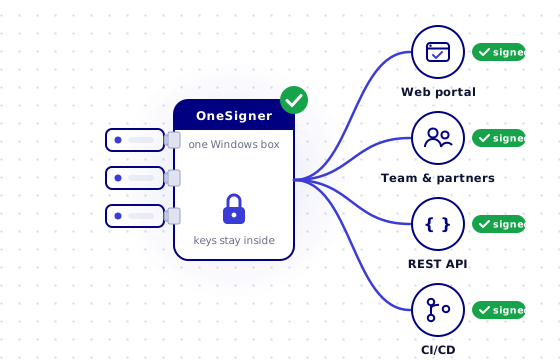
OneSigner is not a cloud that signs for you — it's a service you run. Your USB tokens stay plugged into one Windows machine; your team signs PDFs, your systems automate document signing, and your build servers sign code through it, remotely.
Install the service on one Windows machine and plug in your YubiKey, SafeNet or ePass tokens. Enter each PIN once — stored encrypted, never asked again.
PIN saved · encrypted
Browser portal, REST API, watched folders and a CI endpoint — on your LAN, or on your own HTTPS domain with no port-forwarding.
https://sign.yourco.com
Staff, ERP and pipelines sign remotely. Only the document's digest reaches the token — private keys never leave it — and a signed, timestamped file comes straight back.
200 OK → signed.pdf
See the full architecture, signing flow & 12 standout features →
Pricing
A perpetual license with a year of free updates. No subscription, no per-signature charge. Prices exclude tax.
Certificates
OV and EV code-signing and document-signing certificates from trusted CAs — many come with a free OneSigner license.
Code-signing & document certificates from SSL.com, GlobalSign and Sectigo — OV & EV, USB token options, up to 3-year terms.
In short
OneSigner is a self-hosted PDF signing automation and code signing automation server for Windows. It turns the USB hardware tokens you already own — YubiKey, SafeNet, ePass2003 — into a remote signing service: sign PDF documents with PAdES signatures through a REST API, watched folders or a browser portal, and automate Windows code signing (EXE, DLL, MSI) inside CI/CD pipelines such as GitHub Actions, Azure DevOps and Jenkins using AzureSignTool or OneSignTool over HTTPS. The tokens stay plugged into one machine you control; private keys never leave the hardware. One-time perpetual license, unlimited signatures — no per-signature fees, no cloud HSM subscription, and your files never leave your infrastructure.
By the One Sign engineering team · Updated
Answers
Windows 10/11 or Server 2019 and newer, a USB hardware token (YubiKey, SafeNet or ePass2003), and a valid PDF or code-signing certificate. OneSigner installs as a Windows service.
YubiKey (PIV), SafeNet eToken 5110, Feitian ePass2003 and any USB token or smart card that installs a Windows CSP/KSP minidriver — OneSigner signs through the Windows certificate store, so if Windows sees the certificate, OneSigner can use it.
Yes. Any certificate with a private key in the Windows certificate store works, including a software certificate imported from a PFX file — handy for testing or internal PDF signing. Note that EV code signing and most publicly trusted document-signing certificates are issued on hardware by CA policy, so for those the token is required.
Yes. Each signing profile selects a certificate by serial number, and every tenant, watched folder or API token maps to a profile — so one machine can hold a code-signing token, a PDF-signing token and a partner's token side by side. Pro and Advance plans are multi-tenant.
No. You enter the PIN once in the config app; it is stored encrypted and bound to that machine, then supplied automatically for every signature. The machine keeps an auto-logon desktop session so the token driver stays available to the service.
Yes. Install the free OneSignerBridge on their PC and they sign from the portal's visual signing page with the token in their own USB port — the PDF never leaves their computer. Company tokens stay on the server; personal tokens stay with their owners.
Three ways to sign PDF files automatically: POST documents to the REST API, drop them into a watched folder for bulk PDF signing, or let users sign in the browser portal. Every route applies a PAdES digital signature with an RFC 3161 timestamp from your own certificate — PDF automation without a per-signature fee.
Yes. Point AzureSignTool or OneSignTool at your OneSigner server from GitHub Actions, Azure DevOps, Jenkins, GitLab CI or any build agent — over HTTPS with a signing token. Your OV/EV code signing certificate stays on the USB token, so code signing automation works without exporting keys or plugging tokens into build machines.
No. Reach the service over your own custom domain — no port forwarding and no VPN. TLS is handled for you.
PDF documents (PAdES digital signatures) and Windows executables — EXE, DLL, MSI, CAB and SYS — with Authenticode.
Yes. A full REST API to upload, sign, check status and download, with bearer-token auth and per-tenant scoping. A folder-watch mode is there when you'd rather not call the API.
One-time payment, perpetual license, bound to your machine. Choose Basic (US$99), Pro (US$299), Advance (US$499) or Enterprise. A year of free updates is included.
Yes — a 30-day free trial with every feature unlocked and no card required. Your work carries over when you buy a license.
Install the trial, point it at your token, and sign your first document in minutes.
Questions? support@onesign.sg · One Sign Pte. Ltd., Singapore